Customized Setup for Power Utilities
This section explains how power utilities can manage charging infrastructure in the Sintio portal.
The following topics are covered:
- Service levels (subscription types)
- Purpose of exportjobs
- Third-party system configuration
Offers
The following offers were developed specifically for power utilities:
| Subscription | Description |
|---|---|
| sintio.xlink | This subscription offers advanced features for power utilities, including the export of charger data for third-party systems. It enables seamless integration between the Sintio portal and the utility's internal systems to support efficient billing of charging infrastructure. |
| sintio.xlink+ | This subscription allows power utilities to manage their charging infrastructure independently. Billing is handled directly with the end customer via the Sintio portal. Support and customer contact remain with the power utility. |
Before choosing a service level, we recommend contacting us so we can help you find the best solution for your needs. Our team is available to answer your questions and support you in selecting the right service level.
Configure Export Jobs
Export jobs make it possible to prepare charger data for third-party systems. This is especially useful for connecting e-mobility services with internal systems such as innosolvenergy, e4 by encontrol, or SAP, enabling efficient billing and management of charging infrastructure.
You can find out how to configure your export jobs here.
Configure Third-Party Systems
Below you will find a selection of the available integrations with third-party systems. Is your preferred system not on the list? Feel free to contact us by email.
Examples of Third-Party Systems
innosolvenergy
Overview
This guide describes the end-to-end process for:
- Managing chargers as installation objects of type consumer installation
- Recording and processing meter data
- Ensuring data quality
- Creating billing-relevant meter values
Creation of chargers
Object structure
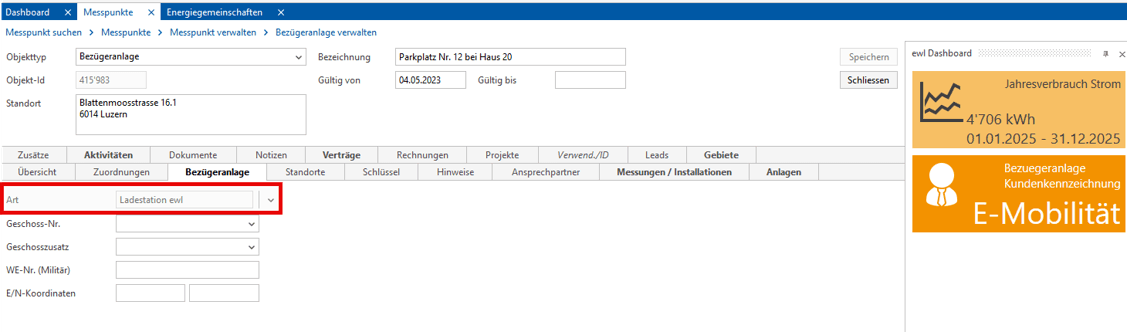
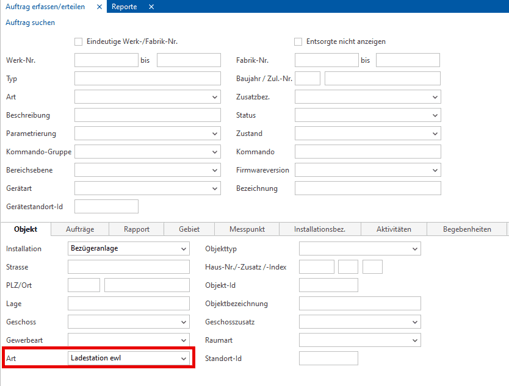
Charging stations are managed in the system as independent installations:
- Object type: Consumer installation / load installation
- Installation type: Charging station
Extended modelling (optional)
For more complex scenarios:
- Multiple users per charger possible
- Individual billing per user
- More flexible assignment of consumption
Setup of virtual metering points
Metering point definition
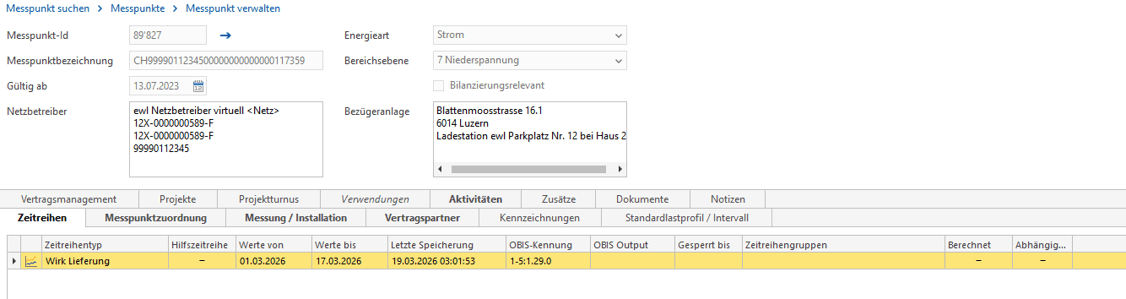
A virtual metering point is created for each charger:
- Unique metering point ID (generated automatically)
- Serves as the key for data transmission
Time series activation
- Activating a time series is required
- This is a prerequisite for processing load profile data
Transmission of metering data
Data source
- External system (e.g. charging infrastructure backend)
Transmission process
- Interval values (typically 15-minute values)
- Daily transmission via interface (e.g. SFTP)
- Automated import into the billing system
Quality assurance of metering data
Gap check
Before billing, the time series must be checked:
- Identification of missing measured values
- Regular review by report (e.g. monthly)

Error correction
Missing data is completed by:
- Manual correction
- Re-transmission of data from the source system
Creation of meter values
Process start
- Started via a system function (e.g. create/execute job)
Processing
- Aggregation of interval values
- Creation of cumulative consumption values
- Storage on the corresponding metering installation
Storage and use of meter values
Storage
- Stored per reading date
- Assigned to the corresponding measurement/installation
Tariff models
Typical models:
- Time-dependent tariffs (e.g. day/night)
- Optional:
- Demand values for demand-based billing
- Extended tariff models
Best practices
- Perform regular data validation
- Use automated reports for gap checks
- Use unique metering point IDs
- Establish standardized processes for meter value creation
- Consider scalable structures for multi-user solutions
Conclusion
Structured management of chargers and reliable metering data processing enable:
- Transparent consumption data
- Flexible and fair billing
- Scalable operation of charging infrastructure
Process diagram: chargers and metering data processing
Migration Process to the Sintio Portal
This chapter describes the most important steps and notes for power utilities that want to migrate their charging infrastructure from the Xlink portal to the Sintio portal.
Role Model
Three different roles are distinguished in the Sintio portal:
- Sintio admin: Sintio employees with access to all organizations and charging infrastructures.
- Organization: Institutions that operate their charging infrastructure with the Sintio portal.
- User: EV drivers who use one or more charging points in your charging infrastructure.
Note: As a power utility, your role corresponds to the Organization role and you act as the administrator. Inform your users about the migration and support them during onboarding.
Preparations
Users
- Create an account according to the guide.
- Add contact details according to the guide.
- Users do not need to store a payment method (credit or debit card).
- Wait until the user has been assigned to the chargers.
If you already maintain a customer register, we can support the migration with a bulk import via Excel file. Please contact us to discuss the details.
Administrators
The Sintio team will be happy to create your organization on request. Contact us by email.
- Complete the organization configuration: create the administrator, tariff, and installation according to the Getting Started section.
- Connect and configure chargers according to the Connect Chargers section.
- Create export jobs according to the Export Jobs section.
Operation with the Sintio Portal
Users
- Overview of the start page in the User Dashboard.
- Information about charging at public stations in the guide.
- Charging sessions can be started/stopped using an RFID badge or the Sintio app.
- Apps from charger manufacturers can no longer be used.
Administrators
- Remote support for users (if needed)
- Adjust tariffs (if needed)
Important Notes
- Schedule the migration of the installations and communicate the timing to users.
- With the sintio.xlink subscription, Sintio AG does not provide debt collection or user support.
- During the migration of chargers to the Sintio portal, users may temporarily be unable to use the charger.
User Onboarding Email Template
Show template
Hello
In connection with your EV charger at Zürcherstrasse 64, 8952 Schlieren, we would like to inform you that H&B Real Estate AG has commissioned us to handle the billing of charging energy across the property portfolio.
We kindly ask you to complete the following steps to create a user account in the Sintio portal so that you can use the charger.
Registration process
- Create an account at www.sintio.com/en/signup (opens in a new tab). If you need help creating the account, you can find a step-by-step guide.
- You do not need to store a credit or debit card, as billing will appear directly on your electricity invoice.
- Charging can be started using an RFID badge or the Sintio mobile app. In your profile, you can add an existing badge or order a new one.
- Important: Please reply to this email and let us know which email address you used to create your user account and from which date you would like the activation. The monthly service fee will only be charged from that date onward.
Notice period
Unless agreed otherwise, the property management or the user may cancel the subscription for the respective charger at any time effective at the end of a month. Notification of the cancellation to Energie Opfikon AG is the responsibility of the property management or the user.
You do not need your charger yet?
If you do not yet own an electric car or do not need the charger yet, you do not need to do anything. The charger remains inactive while not in use. This means no costs will arise for you. As soon as you need the charger, please follow the registration process described above.
Here you will find interesting blog articles on various topics:
- How the Sintio invoice for charging sessions is structured
- How to calculate electricity tariffs for electric mobility correctly
- How offline charging is solved properly
https://www.sintio.ch/en/blog (opens in a new tab)
If you experience technical problems outside office hours, you can reach us via the known support contact details: support@evu.ch
Kind regards